Product updates

Changelog

New features, improvements and fixes shipped to AI Resume Screening — updated as we release them.

Improvement

One design language across the whole site

The editorial look from the home page — serif headings, a hairline grid, and a warmer dark mode — now runs through pricing, the changelog, and every free tool.

The home page refresh landed a look we liked: serif headings at normal weight, small mono labels announcing each section, and structure drawn with hairline rules instead of drop shadows. Everything else on the site was still wearing the old one — rounded cards, bold sans headings, a different background per page. If you moved from the home page to /pricing to a calculator you crossed three different designs.

Now there's one.

Pricing, changelog, and every tool#

/pricing keeps exactly the plans and copy it had, but the tiers now sit in a single ruled grid rather than three floating cards, so the plan strip lines up with the rules used everywhere else. The changelog, the six HR calculators, the boolean search generator, the PDF-to-Word converter, the n8n integration guide and the CV/candidate/software screening pages all got the same treatment.

A warmer dark mode, defined once#

Dark mode used to be nearly black on some pages and a cool blue-grey on others. The blue-grey won. It's now defined a single time on the page itself — a soft diagonal wash under a faint grid — so every page, including ones we haven't written yet, inherits it automatically. Cards and panels sit one step forward from that canvas instead of guessing at their own colour.

Small fixes that came with it#

  • No more double footers. A few pages were rendering the site footer twice, or a stray copyright line underneath the real one.
  • Proper heading order. The home page's h1 is the product name again, with the hero copy reading as the standfirst it always was — better for screen readers and for search engines.
  • Consistent form controls. Inputs across the calculators now share one style instead of six near-identical variants.

Nothing moved and nothing was removed — the tools calculate exactly what they did yesterday. It should just feel like one product now.

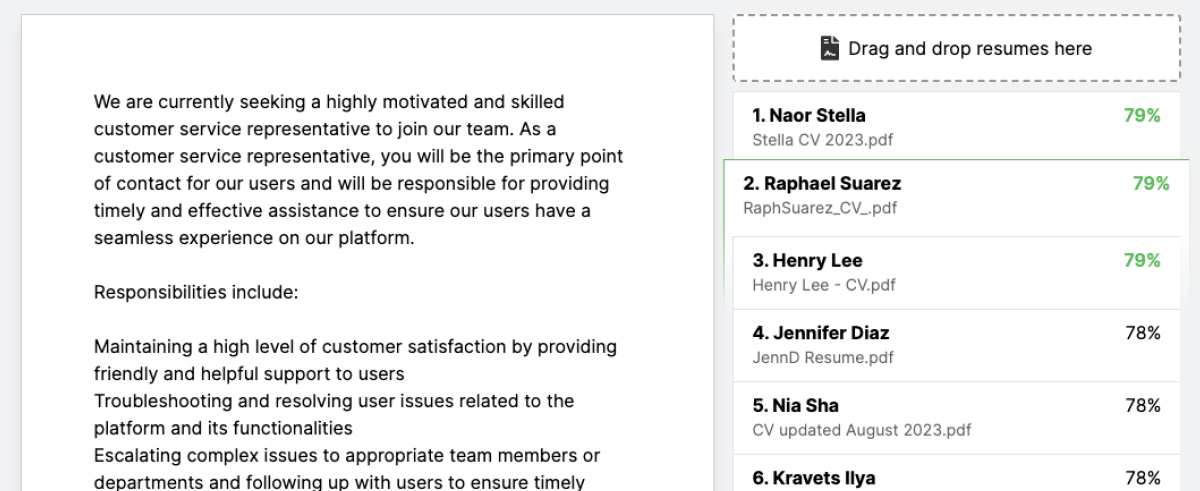
The refreshed ResumeScreening.ai workspace for entering a job brief and uploading resumes
ImprovementBilling

A clearer screening workspace and pricing that scales

ResumeScreening.ai now has a more focused, evidence-first workspace—and Starter and Pro subscriptions are back for teams that screen candidates every month.

Today we made ResumeScreening.ai clearer to evaluate, easier to navigate, and better suited to serious hiring workflows. We also reintroduced tiered pricing, giving occasional recruiters a flexible entry point and growing teams better value as screening volume increases.

A more focused screening workspace#

The landing page now presents the product as an evidence-first hiring tool: define the role, upload the candidate pool, and review a ranked shortlist with the reasoning behind every match.

The working area has been redesigned around the task itself. The job description now sits on an A4-proportioned page, uploads have a clearer dedicated space, and the full application aligns with the same responsive container as the rest of the site. The Save control stays out of sight until there is actually something to save.

We also refined the supporting experience:

  • a cleaner enterprise-oriented visual system with one consistent purple brand accent;
  • improved spacing, content hierarchy, and responsive behavior across desktop and mobile;
  • a dark-mode product preview and compact Light, Dark, and System controls;
  • a simpler three-column footer with Product, Resources, and Company links;
  • clearer product statistics and an updated walkthrough of the screening workflow.

Tiered pricing is back#

You can still start without a subscription. Pay as you go is 7¢ per resume, your balance never expires, and every new account includes $5 in screening credit—about 71 resumes.

For recurring hiring, the subscription plans offer substantially better value:

PlanPriceIncluded each monthBuilt for
Starter$20/month or $200/year200 resume screens, up to 3 team seatsSmall hiring teams that want predictable monthly capacity and shared workflows
Pro$50/month or $550/year1,000 resume screens, unlimited team seats and API accessRecruiters and growing teams screening at higher volume

Both plans include AI ranking with match reasoning, unlimited custom scoring fields, spreadsheet uploads, job inbox screening, CSV exports, and one month of credit rollover.

Most importantly, screening no longer stops when the monthly allowance runs out. Extra resumes automatically use your prepaid balance at 7¢ each on Starter and 5¢ each on Pro, so a live hiring round is never interrupted by a plan limit.

The result is a simpler path for every team: start free, use pay as you go when hiring is occasional, and move to Starter or Pro when predictable volume makes a subscription more economical.

Compare plans and choose the right fit →

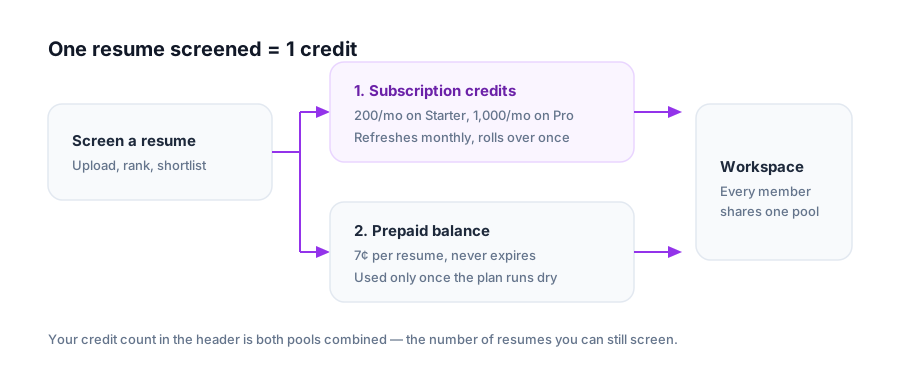
The two credit pools on an account — monthly subscription credits and a prepaid balance
NewBilling

Subscription plans, shared credits and top-ups

Starter and Pro plans are back, credits are shared across your whole workspace, and any overflow is billed from a prepaid balance instead of blocking a screen.

One credit screens one resume. Until now that was the only thing you could buy. Teams that screen predictably every month were paying per resume for volume they already knew they needed, and running out mid-shortlist meant a checkout detour before the next upload.

Two plans, one credit#

Starter is $20/month for 200 credits, with two months free on annual billing. Pro is $50/month for 1,000 credits, with one month free annually. Subscription credits refresh on every invoice and roll over for one month, so a quiet week isn't lost.

Top-ups pick up where the plan stops#

Screens beyond your monthly allowance draw from a prepaid balance at 7¢ per resume rather than failing. Top-up packs never expire, and new accounts still start with $5.00 of balance — about 71 free screens — so you can try the whole flow before paying anything.

A screen always spends a subscription credit first and only falls back to the balance once the monthly pool is empty. Your credit count in the header is the sum of both.

Workspaces share one pool#

Billing lives on the workspace owner's account, so everyone you invite screens against the same credits — no per-seat top-ups, no surprise second subscription. Seat limits come from the plan, and /settings shows who's using them.

See pricing for the full breakdown.

ImprovementFix

Faster ranking and sturdier resume parsing

Embeddings now run on Voyage with OpenAI as a fallback, and the parsing pipeline stopped giving up on the awkward files recruiters actually receive.

Screening a batch is only as good as the weakest file in it. A single malformed PDF used to be enough to stall a run, and re-ranking a job meant recomputing embeddings that hadn't changed.

Multi-provider embeddings#

Resume and job embeddings are generated by Voyage, with OpenAI kept as an automatic fallback. The schema now records which model produced each vector, so a provider can change without invalidating everything already stored — and matches keep improving without a re-upload.

Parsing that survives real files#

  • Scanned and image-only PDFs fall through Textract → Google Vision → local parsers instead of failing on the first miss.
  • Textract now receives document bytes directly, removing an S3 round-trip from every upload.
  • DOCX files that previously failed silently return real text, and corrupt PDFs surface a clear error on the resume instead of stalling the batch.
  • Very long resumes are truncated to fit model limits rather than being rejected.

Fewer dead ends#

"Resume is too short" is now shown on the resume itself, so you can see which upload needs a better copy. Uploading on the landing page without an account works again, and the job you were drafting is kept while you sign up.

New

Free PDF to Word converter

Turn a candidate's PDF resume into an editable .docx in the browser, no account required.

Hiring managers still ask for editable resumes — to strip contact details before a panel review, or to drop a candidate into a client template. That used to mean retyping.

The PDF to Word converter takes a PDF resume and returns a .docx with the text extracted through the same parsing pipeline we use for screening, so scanned and image-only PDFs work too. It's free and needs no account.

Once you're converting resumes in bulk, upload them straight into a job instead — ranking a shortlist is faster than reading one.

New

AI Resume Builder for candidates

A chat-based resume coach that reads an uploaded resume and gives specific, checklist-driven feedback instead of generic advice.

We spend most of our time on the hiring side of the screen. But the resumes arriving in those batches are often weak for fixable reasons — an unquantified achievement, a home address nobody needed to share, dates that don't line up.

Upload, verify, improve#

The AI Resume Builder takes a dropped resume, parses it through the same pipeline that powers screening, and pulls the email address out of it to send a six-digit verification code. Once verified you're in a chat with a coach that has already read the document — no pasting, no re-typing.

Feedback against a real checklist#

Rather than "make it more impactful", the review works through concrete items:

  • Contact details, flagging a home address as an unnecessary privacy risk.
  • Date formatting and chronological order across roles.
  • Experience bullets rewritten toward the STAR method.
  • Achievements that state an outcome but no number.

Where a section is too thin to assess, it asks a follow-up question instead of inventing content. You can attach up to three files — resume, cover letter and the job description — so the advice is aimed at the role you're actually applying for.

New

Three free HR calculators

Turnover rate, time to hire and severance packages — interactive calculators with industry benchmarks, free and without an account.

The questions that come up around a hiring decision usually aren't about the shortlist. They're about what the vacancy is costing, whether attrition is normal for the industry, and what a separation package should look like. Three new calculators answer those, free and with no sign-up:

  • Employee Turnover Calculator — turnover rate plus the replacement cost behind it, benchmarked against typical rates by industry.
  • Time to Hire Calculator — how long your process actually takes and what each open day costs in lost productivity.
  • Severance Pay Calculator — a full package including PTO payout, benefits continuation and outplacement, with notes on WARN Act and OWBPA timelines.

Each one comes with the benchmarks and context you'd otherwise go hunting for, so the number is usable in a conversation rather than just a number.

They join the salary, hourly-to-salary and cost-per-hire calculators already on the site.

New

Team workspaces

Invite your hiring team into a shared workspace with its own jobs, resumes and billing — while your personal work stays private.

Screening is rarely a solo job. Until now every account was an island: a recruiter and the hiring manager reviewing the same role each uploaded their own copies of the same resumes, and neither could see the other's shortlist.

Personal and team, side by side#

You now have a Personal workspace that behaves exactly like your account always did, plus any team workspaces you create or get invited to. A switcher in the header moves you between them, and jobs, resumes and rankings are scoped to whichever one is active — so client work and private experiments never end up in the same list.

Invites and roles#

Invite teammates by email from settings. Each member is an Owner, Admin or Member, and ownership can be transferred without recreating the workspace or moving its jobs — useful when the person who set it up changes teams.

Billing per workspace#

Each workspace carries its own balance and subscription on the owner's account, so a team's screening is paid for once and shared by everyone in it rather than charged to whoever happened to hit upload. Switching workspaces switches the credit count in the header along with it.

Get started free

Screen resumes in seconds

Upload hundreds of resumes, describe the role, and get a ranked shortlist. Every new release lands in your account automatically.

Try Resume Screening AI free